


S4U Assen - Hybrid watch face
4.5101.00 Reviews
App Specs
- Version
- Varies with Device
- Updated On
- License
- $1.99
- Downloads
- 100,000+
- Developer
- styles4you
- Categories
- Personalization
- Platform
- Android
Screenshots
 Analysis by AppCompare
I tend to judge a watch face by one practical question: can I read what I need quickly, without giving up the look of a traditional watch? That is the appeal of S4U Assen - Hybrid watch face. It combines an analog-style presentation with digital information, so the result feels more like a watch with a useful dashboard than a phone screen shrunk onto my wrist. If you enjoy personalizing your smartwatch but still want the time to be the main event, that balance is worth a closer look.
Why the hybrid layout matters
The useful idea here is not simply putting hands and digital details together. It is having two familiar ways to read the time share one face: I can glance at the hands for the broad sense of the hour, then use the digital elements when I want an exact read. That distinction makes the design feel natural in quick-glance situations, such as checking the time while walking or between tasks, rather than requiring me to stop and interpret a busy display.
A fully digital face can be exceptionally clear, especially when I want a large time readout, but it may feel more like a small screen than a watch. A purely analog face can look restrained, yet offers less room for the glanceable information many smartwatch owners expect. This hybrid approach sits between those choices. I would pick it when I want a more traditional visual character without giving up the convenience of digital details.
Making the display fit the day
The customization matters because a watch face is seen repeatedly in changing conditions: indoors, outside, during work, and when I am moving. I would start by choosing a color treatment that keeps the time easy to distinguish from the surrounding details, rather than choosing a scheme solely because it looks striking in the settings. A face that is attractive but hard to scan quickly is a poor trade for something I check dozens of times a day.
It also helps to decide what role the watch should play. If I mainly want a quick time check, I would keep the display visually calm. If I regularly glance at the date, battery level, or step count, I would make sure those details remain easy to locate without competing with the hands. The point of customization is not to use every option at once; it is to make the information I actually care about feel obvious.
For example, on a busy morning I might check the time while packing a bag, then glance again later to see whether my step count is moving during a walk. Those are different kinds of checks, but both benefit from information being visible at a glance. I would set up the face at home, use it through an ordinary day, and then change only the element that proved awkward. That small test is more useful than endlessly adjusting colors before I know what I need.
What it is like to set up
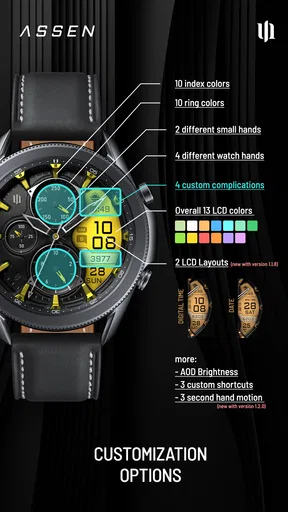
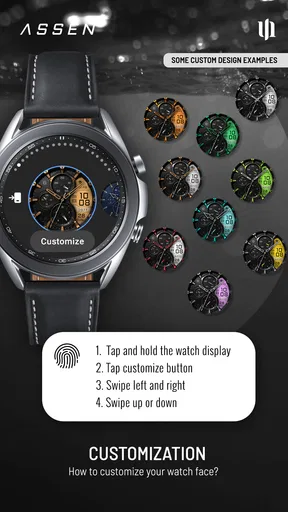
In my experience with the layout described here, the appeal is that the face is meant to be adjusted rather than accepted as one fixed design. The options make it possible to tailor the appearance and time format to personal taste. I would check each choice on the watch itself after applying it: a setting that looks clear in a setup screen may feel too dense or too faint at wrist distance.
Worth Reading Before You Choose

EA SPORTS FC Mobile 26 Is a Bigger Football Game, but It Takes Time

Flipboard Shows What News Apps Must Do Beyond the Feed

Switching to Android Auto Means Rethinking Your Driving Routine

Google Calendar Makes a Crowded Week Easier to Manage

Ludo King Makes the Most of the Minutes Between Plans

Baby Panda World Brings Quick Play to Modern Phones, but Its Game Library Feels Busy
That is also where I would be realistic about the limits of any information-packed face. Adding more visible details can make it less immediate to read, and a hybrid design will not suit someone who wants a completely bare dial. It is a matter of deciding whether the added digital information earns its space. If the step count or battery indicator is not something you check, you may prefer a simpler alternative and a cleaner face.
The Look and Feel
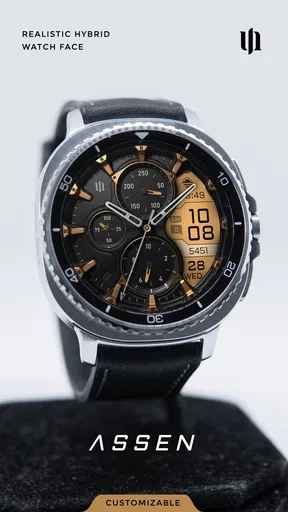
First off, let's talk about the aesthetics. The S4U Assen - Hybrid watch face is a stunning blend of digital and analog elements. It's got that slick, modern vibe that makes you feel like you're wearing a piece of the future on your wrist. The color schemes are vibrant without being overpowering, and the design manages to stay elegant yet functional.
The real kicker here is the hybrid aspect. You get the best of both worlds: the classic appeal of analog and the convenience of digital. It’s like having a tiny control center right on your wrist! I found myself constantly glancing at it, not just to check the time, but because it genuinely looks that good.
Functionality at Its Finest
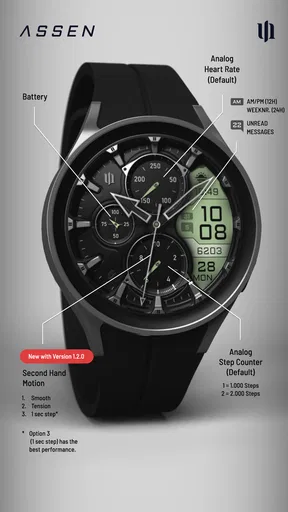
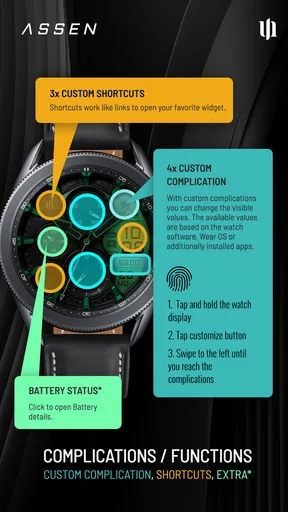
Now, onto the features. This watch face isn’t just about good looks; it’s packed with functionalities that make your life a tad easier. It displays everything you might need at a glance: time, date, battery level, and even a step counter. It’s like having a mini dashboard that's always with you.
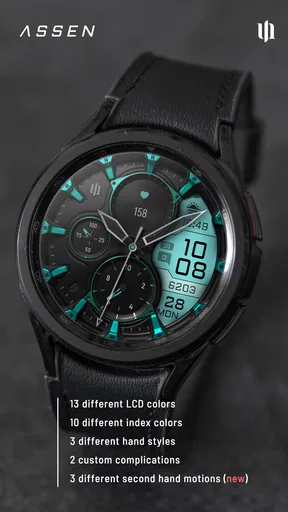
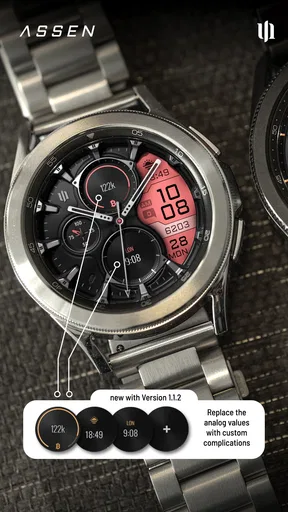
The settings allow for customization, so you can tweak it to fit your preferences. Want to change the color scheme? Go for it. Need to adjust the time format? Easy peasy. It’s all about making the watch face work for you, and I appreciate that level of personalization.
User Experience
Alright, let's talk about usability. Installing the watch face was a breeze. A few taps here and there, and voila! You're ready to rock that hybrid style. The interface is intuitive, and even if you're not tech-savvy, you’ll find navigating through the options straightforward.
One thing I noticed was how smooth everything ran. No lag, no glitches, just seamless operation. It’s clear that the developers put a lot of thought into making sure the app runs efficiently without draining your smartwatch's battery. And that’s a big plus in my book!
Price, fit, and everyday expectations
One practical point to weigh before choosing it is that this is a paid personalization app, listed at $1.99. I think that makes the decision fairly simple: if you are likely to keep the face on your watch and use its mix of analog style and glanceable details, the cost may feel reasonable; if you change faces every few days, a free option may be a better fit. The age rating is Everyone, and the app is made by styles4you.
It was released on August 10, 2023, and has a 4.7 average from around 2.8 thousand ratings, with over 100 thousand installs. I treat those figures as useful context, not proof that the face will suit every wrist or preference. The more useful question is whether the hybrid layout solves a problem for you: keeping the familiar look of watch hands while still surfacing details you would otherwise reach for your phone to check.
Where it fits—and where it does not
I see this as a good choice for someone who wants their smartwatch to look less like a miniature app launcher and more like a conventional watch, but who still values digital convenience. It is especially appealing if you routinely check the date, battery level, or step count and would rather see those details together than switch to separate screens. The face also suits people who enjoy making small visual adjustments until their watch feels personal, rather than settling for a default design.
There are clear cases where I would choose something else. If you want the largest possible digital time, a simple digital face will likely be quicker to read. If your priority is a spare, uncluttered dial, a plain analog design will feel calmer. And if customization itself is not enjoyable to you, the appeal of changing colors and formats may not outweigh the simplicity of leaving a built-in face alone. This is a specific middle ground, not a universal upgrade.
I would also avoid assuming that more information automatically means more usefulness. A step count is handy when I am trying to stay aware of everyday movement, but it is not a substitute for a dedicated fitness view when I want a detailed activity breakdown. Likewise, a battery indicator is helpful for a quick check, but it does not make the watch face a battery-management tool. Its strength is making selected basics visible, not replacing specialized watch functions.
A small setup routine that pays off
My practical tip is to set the face up in two passes. First, choose the time format and colors that make the time easiest to read in your normal lighting. Then wear it through a typical day before deciding whether the date, battery, and step count are placed and styled clearly enough for you. This avoids a common personalization trap: building a pretty arrangement in the settings and discovering later that the important detail is hard to spot at a glance.
If you use the step count as a gentle prompt to move, check it at a consistent point in your day—perhaps after lunch or when you return from an errand—rather than treating every glance as a meaningful measurement. The face can make that number convenient to notice, but the useful habit comes from how you interpret it. For battery awareness, a quick check before leaving home is similarly more actionable than repeatedly watching the indicator throughout the day.
These small choices also help answer a common decision: will the hybrid layout be too busy? It can be if every available detail draws equal attention. I would let the hands and time remain visually dominant, then treat the other information as supporting material. If, after a day or two, I find myself hunting for the time or ignoring the extra details, that is a sign to simplify the setup or return to a cleaner face.
How I would choose between this and alternatives
Compared with the usual options in smartwatch personalization, this face is for people who want a design-led compromise. A built-in digital face often wins for instant legibility, while a basic analog face wins for visual simplicity. S4U Assen is more interesting when neither extreme feels right: I want hands to give the display a watch-like identity, but I also want digital information nearby. That is a real preference, not a claim that the hybrid format is inherently better.
Its value therefore depends on the watch owner’s habits. Someone who checks only the time may not need the extra details; someone who likes a traditional dial but repeatedly opens separate views for basic information may appreciate the consolidation. If the watch already has a face that presents exactly the details you use in a clearer layout, there is little reason to switch just for novelty. I would compare the faces by asking which one lets me answer my usual wrist-side questions with fewer taps and less visual effort.
Final Thoughts
In conclusion, if you're on the hunt for a watch face that combines style with functionality, the S4U Assen - Hybrid watch face is a fantastic choice. It beautifully marries the classic charm of analog with the modern convenience of digital, all wrapped up in a sleek design that’s sure to turn heads.
Whether you’re a tech guru or just someone who loves a good-looking watch, this app has something for you. It's customizable, user-friendly, and just plain cool. So go ahead, give your smartwatch the upgrade it deserves. You won’t regret it!
My recommendation
My recommendation is to choose it for the specific hybrid idea, not simply because you want a new look. The combination is most rewarding when you genuinely use the visible basics and enjoy seeing an analog presentation on your wrist. The app is in the personalization category, and its 4.7 average is a positive signal, but the best test is still whether its design feels clear and comfortable in your own routine.
If you like a traditional watch appearance with digital information close at hand, I would put it on your shortlist. If you prefer a plain dial, a very large numeric time display, or a face centered on deeper activity detail, another style will serve you better. For me, the appeal is that it makes an everyday time check feel more like looking at a watch while keeping useful context within the same glance.
Pros
- Customizable watch face options.
- Efficient battery usage.
- Seamless integration with Android Wear.
- Clear and user-friendly interface.
- Regular updates and support.
Cons
- Limited functionality on iOS.
- Requires purchase for full features.
- Customization can be overwhelming.
- Some users report minor bugs.
- May not suit traditional watch lovers.
FAQs for S4U Assen - Hybrid watch face
What are the main features of the S4U Assen - Hybrid watch face?
The S4U Assen - Hybrid watch face offers a unique blend of digital and analog displays, providing users with customizable options to suit their style. It includes features such as step tracking, heart rate monitoring, multiple theme options, and weather updates. The interface is user-friendly, allowing easy navigation and personalization.
Is the S4U Assen - Hybrid watch face compatible with all smartwatches?
The S4U Assen - Hybrid watch face is designed for Wear OS devices. Before downloading, ensure your smartwatch supports Wear OS to avoid compatibility issues. It's always a good idea to check the app specifications and your device's compatibility in the app store to ensure optimal performance.
How can I customize the S4U Assen watch face to suit my preferences?
Customizing the S4U Assen watch face is straightforward. Users can access the customization settings directly on their smartwatch or through the companion app. Options include changing colors, selecting different styles for the digital and analog displays, and adjusting the information widgets to display preferred data like steps or weather.
Does the S4U Assen watch face impact battery life?
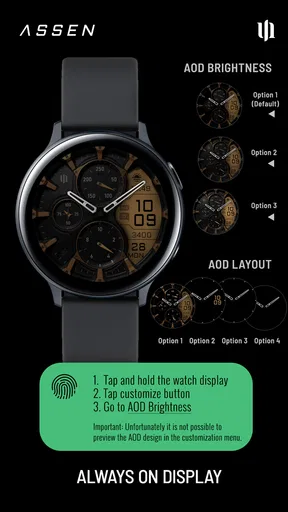
Like most feature-rich watch faces, the S4U Assen may have a slight impact on battery life due to its continuous updates and animations. However, it is optimized for efficiency. Users can manage battery usage by adjusting settings such as dimming the display or reducing update frequency for certain widgets.
Is there customer support available for issues with the S4U Assen watch face?
Yes, the developers of the S4U Assen watch face offer customer support for any issues or questions users may encounter. You can contact them via the support email provided in the app store listing. Additionally, troubleshooting guides and a FAQ section are often available on the developer’s website to assist with common concerns.


